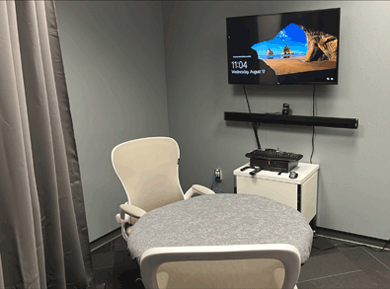
The Library provides computers and other equipment to support your research, educational and Duke-related work activities.
Computers | Data Stations | Printing | Scanners and Photocopiers | Large Screen Monitors | Audio/Video Recording Studio
Computers

- Computer workstations are located on Level 1 (Computer Classroom - reservable) and Level 2R (non-reservable)
- Login with your DHE active-directory account that you use for signing into Duke Medicine desktops.
- Public workstations and PIN (Patient Information Network) stations are located on Level 2R.
Data Stations
- The public workstations on Level 2R in the open seating area have been configured with some data analysis and visualization software.
- For a full list of available software, see our Data Analytics and Visualization Software LibGuide.
- Please use the Recommend a Purchase form to request any software additions for these workstations.
Printing
- ePrint
- ePrint is a Duke printing service that enables subsidized black and white printing.
- The Library has one ePrint station on level 2R across from the Service Desk.
- Additional ePrint stations are available throughout the main campus.
- For more information about ePrint, student printing allocations, and links to download the client for your computer, see eprint information on the the OIT Website.
- Color Printing
- Color print copies cost 15 cents per page and require the use of funds from your DukeCard flex account.
- To add money to your card, consult the DukeCard Office's options for Flex Accounts.
- Printing from Computers
- All computers on Level 2R (except PIN workstations) allow users to print to ePrint or the color printer using their own Duke Health ID cards.
- All Duke Health faculty, staff, and student cards have subsidized black and white printing.
- Black/white print copies cost 6 cents per page; Color print copies cost 15 cents per page.
- Add money to your card though the DukeCard Office's options for Flex Accounts.
Scanners and Photocopiers
- Self-service copiers are located on Level 1 (Rm 102C) and Level 2R (across from the Service Desk).
- Photocopies cost 7 cents per copy.
- Scanning station is located on Level 2R.
- You may save to a USB drive, send to the printer (7 cents per page) or send to email.
- Color scanning can be done from the self-service copiers at no charge.
- Copiers are located on Level 1 (Room 102C) and Level 2R (across from the Service Desk).
- Instructions are on each copier.
- You will need a USB drive for storing the images.
Large Screen Monitors
Large screen LCD panels can be connected to laptops in group study rooms
- 102A and 102B (Level 1)
- 315, 316, 319, 320, and 321 (Level 3)
These group study rooms are available for booking

Audio/Video Recording Studio (Level 3, Room 322)
The Audio/Video Recording Studio is available for reservation by Duke Health faculty, staff, and students. This studio can be used to record audio and/or video for lectures, podcasts, presentations, training sessions, and more.
View the current schedule for the Audio/Video Recording Studio to check for availability.
Equipment: Lenovo ThinkCentre - Windows 10; Osborn 4k camera with AI and remote; LG 40 inch mounted display with remote; wireless keyboard and mouse; Shure Stem wall sound bar Reservation Policy
| |